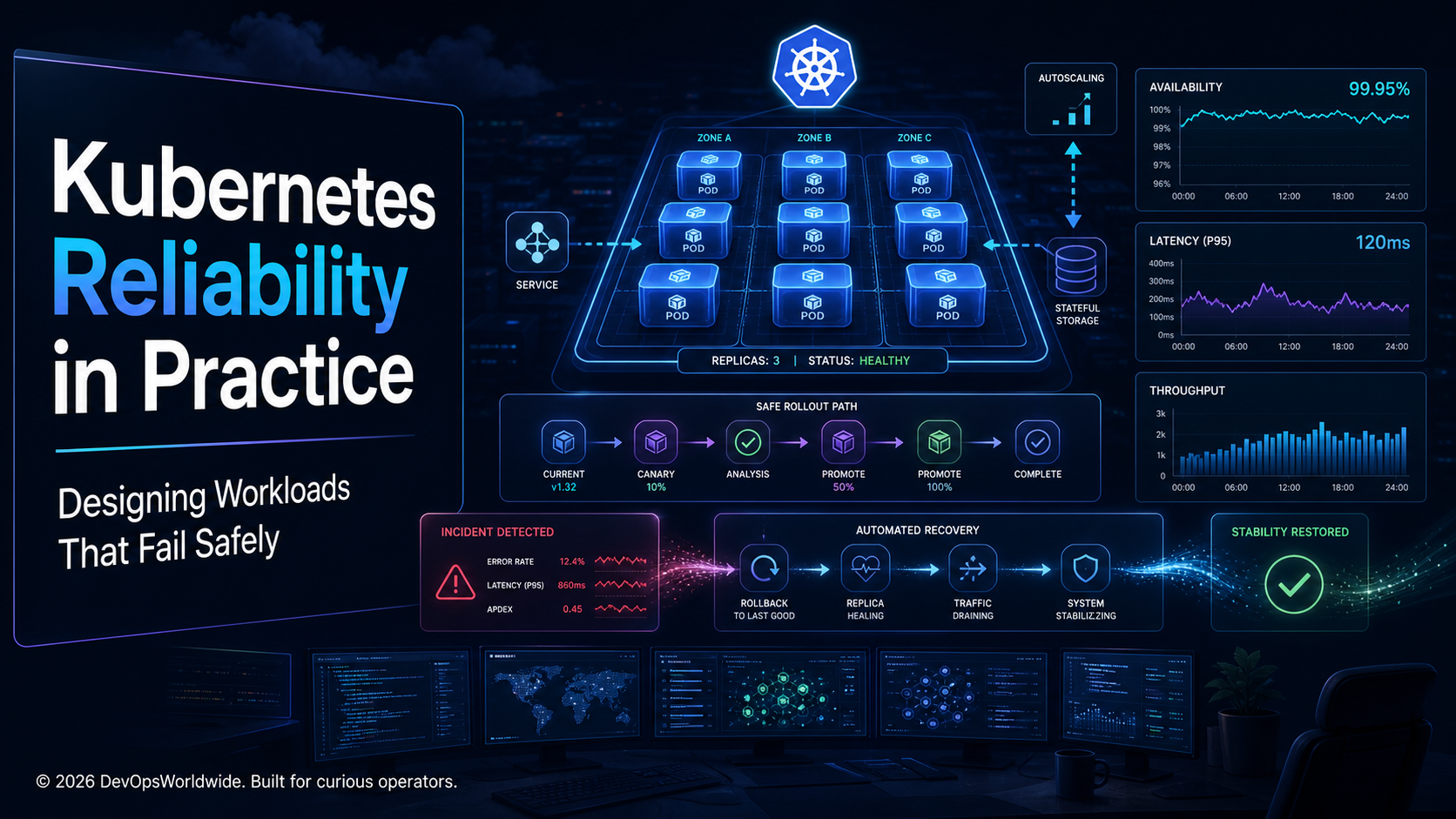
Kubernetes can restart a pod. It cannot, by itself, make a service reliable.
Reliability emerges from the choices around that restart: whether the replacement is ready before it receives traffic, whether it has enough CPU to start, whether a deployment can drain safely, whether an upstream outage causes a retry storm, and whether the team can tell a harmless blip from real user harm.
This is a workload-level guide to those choices. The objective is not “zero failures.” It is to make failures bounded, observable, and recoverable—so a routine node drain, a bad release, or a slow dependency does not become an incident that surprises customers.
Start with the user journey, not the pod count
Three replicas are not automatically highly available. A service can have every pod in Running while requests fail because the pods are not ready, the database is saturated, a shared dependency is timing out, or all replicas sit in the same failure domain.
Define reliability in terms that matter to the service:
- Availability: can a user complete the important request?
- Latency: does that request finish within a useful time?
- Correctness: did the service return a correct result without duplicate work?
- Recovery: how quickly can the team restore a known-good state?
An SLO turns that agreement into an operating boundary. For example: “99.9% of successful checkout requests complete in under 800 ms over 28 days.” The error budget is then a decision tool. When it burns quickly, slow down releases and investigate; when it is healthy, keep delivery moving.
Reliability principle: Kubernetes health is an input to service health—not a substitute for it.
The workload contract: resources, startup, readiness, and shutdown
The most valuable reliability controls often live in a small part of the deployment manifest. They state what the application needs and how Kubernetes should treat it while starting, serving, and stopping.
apiVersion: apps/v1
kind: Deployment
metadata:
  name: checkout
spec:
  replicas: 3
  strategy:
    type: RollingUpdate
    rollingUpdate:
      maxUnavailable: 0
      maxSurge: 1
  template:
    spec:
      terminationGracePeriodSeconds: 45
      containers:
        - name: checkout
          image: registry.example.com/checkout:2026.08.08
          resources:
            requests:
              cpu: 250m
              memory: 512Mi
            limits:
              cpu: "1"
              memory: 1Gi
          startupProbe:
            httpGet: { path: /health/startup, port: 8080 }
            failureThreshold: 30
            periodSeconds: 5
          readinessProbe:
            httpGet: { path: /health/ready, port: 8080 }
            periodSeconds: 5
            failureThreshold: 2
          livenessProbe:
            httpGet: { path: /health/live, port: 8080 }
            periodSeconds: 10
            failureThreshold: 3
          lifecycle:
            preStop:
              exec:
                command: ["/bin/sh", "-c", "sleep 10"]
Requests and limits are capacity decisions
Requests influence scheduling. If they are copied from a template instead of measured, a workload can be placed on a node that never had enough headroom for its normal start-up burst. Limits protect the node, but an aggressive CPU limit can turn latency into throttling exactly when traffic is high.
Use production usage, load tests, and a defined burst policy to set them. Revisit them after material code, runtime, or traffic changes. Memory limits deserve particular care: an out-of-memory restart looks clean in a deployment dashboard but can be a repeated customer-facing failure.
Each probe answers a different question
| Probe | Question it should answer | Common mistake |
|---|---|---|
| Startup | “Has this slow-starting process finished booting?” | Omitting it and letting liveness kill a legitimate start-up |
| Readiness | “Can this pod serve this request now?” | Marking ready while caches, listeners, or migrations are incomplete |
| Liveness | “Is the process stuck and unable to recover?” | Restarting a healthy process because a remote dependency is slow |
Readiness is a traffic safety gate. When it fails, Kubernetes removes the pod from service endpoints without necessarily restarting it. Liveness is much more forceful; keep it local to the process and use it sparingly. A liveness probe that depends on a database can multiply a database incident into a fleet-wide restart.
Shutdown is part of availability
During a rollout or node drain, the application needs time to stop accepting new work, complete or hand off in-flight requests, and close connections cleanly. The preStop delay above is only useful if the application also handles SIGTERM correctly. Test that behaviour under realistic load; a graceful shutdown that only works in an idle test environment is not graceful enough.
Protect voluntary disruption without blocking operations
A PodDisruptionBudget (PDB) prevents maintenance work from voluntarily taking down too much of a replicated service at once. It complements—not replaces—spreading and sensible replica counts.
apiVersion: policy/v1
kind: PodDisruptionBudget
metadata:
  name: checkout
spec:
  minAvailable: 2
  selector:
    matchLabels:
      app: checkout
For a three-replica service, this permits one voluntary disruption at a time. Pair it with topology spread constraints or anti-affinity so “three replicas” does not really mean “three pods on one vulnerable node.”
Do not set PDBs mechanically. A budget that is too strict can block a critical node drain; one that is too loose makes the maintenance window risky. Treat it as a documented business decision: how much capacity can this service safely lose, and for how long?
Release safety: prove the new version before giving it the fleet
Most avoidable outages are release-management failures rather than scheduler failures. A safe rollout needs three things: a small blast radius, meaningful evidence, and a fast route back.
For an ordinary rolling update, maxUnavailable: 0 and a small surge keep known-good capacity serving while the new version proves readiness. For higher-risk changes, use a canary or progressive delivery process and observe a narrow set of signals:
- Request success and latency for the canary cohort.
- Resource pressure, restarts, and saturation relative to the previous version.
- Domain metrics such as checkout completion, queue age, or payment declines.
- Dependency error rates and retry volume.
Decide rollback criteria before the deployment begins. “The dashboard looks strange” is not actionable; “rollback if the canary increases five-minute error rate by 1% or burns the availability budget 4x faster” is. Capture the image tag, configuration revision, migration state, and observed metrics in the release record so the team can reason from evidence instead of memory.
Autoscaling needs headroom, not optimism
Horizontal Pod Autoscaling (HPA) is effective when the chosen signal reflects the work that is actually building up. CPU can be useful for compute-bound services; queue depth, active requests, or a business event rate may be better for asynchronous or I/O-heavy workloads. Event-driven workloads may benefit from KEDA when a queue or stream is the natural demand signal.
Autoscaling cannot repair every bottleneck. If a downstream database has a fixed connection ceiling, scaling application pods may make the incident worse. Build a capacity model that includes:
- Steady-state demand: normal replicas and resource use.
- Burst headroom: how much extra capacity is needed before scaling completes.
- Warm-up time: image pulls, init work, cache warming, and readiness delay.
- Dependency limits: connection pools, rate limits, partitions, and quotas.
- Scale-down safety: enough stabilization to avoid oscillation during noisy traffic.
Test the model with a controlled load increase. The useful question is not “did replicas go up?” It is “did the user journey remain inside the SLO while replicas went up?”
Design for degraded dependencies
Kubernetes will keep your application running while an upstream dependency is slow. The application must decide what to do next.
Start with a clear failure policy for every important dependency:
| Dependency outcome | Safe application response |
|---|---|
| Read-only profile service is slow | Serve a bounded stale response or a clear degraded experience |
| Payment provider times out | Do not blindly retry a non-idempotent charge; return a traceable pending state |
| Message broker is unavailable | Apply backpressure, persist safely if designed for it, and expose queue age |
| Feature-flag service is unavailable | Use a documented last-known-good value or conservative default |
Timeouts should be shorter than the caller’s remaining budget. Retries need jitter, a limit, and idempotency awareness. Circuit breakers and bulkheads stop one saturated dependency from consuming every worker or connection in the service. These are not abstract resilience patterns; they are the difference between a contained upstream problem and a cascading outage.
Operate from evidence during an incident
An incident response path should narrow uncertainty quickly:
SLO burn or user report
        ↓
Request success and latency by endpoint
        ↓
Pod readiness, restarts, events, and resource pressure
        ↓
Deployment/configuration revision and recent change
        ↓
Dependency health, retries, queue depth, and saturation
        ↓
Mitigate, verify the user journey, then record the learning
This sequence prevents two common traps: treating every pod restart as the cause, and treating a green cluster dashboard as proof that customers are fine. Keep a short runbook beside the service with owners, dashboards, rollback steps, dependency failure policies, and an explicit “how to verify recovery” step.
A Kubernetes reliability scorecard
Use this as a review tool for a production workload. “No” is not a failure; it is a concrete improvement to prioritize.
| Capability | Evidence to look for |
|---|---|
| User-centred SLO | A documented journey, target, error budget, and alert policy |
| Safe traffic admission | Readiness reflects actual ability to serve; startup and liveness are distinct |
| Real capacity contract | Requests/limits are measured, not copied; memory failures are reviewed |
| Controlled disruption | PDB and topology spreading match the service’s required availability |
| Reversible delivery | Canary or bounded rollout, pre-agreed rollback signal, known-good revision |
| Demand resilience | Autoscaling tested under load and bounded by dependency capacity |
| Dependency containment | Timeouts, retry policy, idempotency rules, and degraded-mode decisions exist |
| Incident readiness | Runbook identifies owners, evidence, mitigation, and user-level recovery check |
A practical 30-day starting plan
Week 1 — map the failure modes. Pick one tier-1 workload. Write its user journey, dependencies, SLO, and current rollback path. Examine the manifest alongside a recent incident or near miss.
Week 2 — fix the traffic and lifecycle contract. Add or correct startup, readiness, liveness, resource settings, graceful shutdown, and disruption protection. Validate them with a small controlled test.
Week 3 — make delivery measurable. Define canary or rollout thresholds, record release evidence, and run a rollback rehearsal. Ensure the on-call engineer can find the last known-good revision.
Week 4 — test a dependency failure. Simulate a bounded timeout or error condition in a safe environment. Confirm retries do not amplify load, dashboards show customer impact, and the recovery check is clear.
The result is not a perfect cluster. It is a workload that fails in predictable ways, preserves as much useful service as it can, and gives engineers a calm path back to safety.
Clear takeaways
- Kubernetes reliability is measured at the user journey, not by
Runningpods. - Readiness, resources, graceful termination, and disruption budgets form a practical workload safety contract.
- Progressive delivery and tested rollback criteria make change safer than hope.
- Scaling and retries must respect the capacity of the dependencies behind the service.
- The best incident response verifies recovery from the customer’s point of view.