Self-healing is one of those phrases that can create the wrong expectation. A production platform should not restart, scale, or roll back everything that looks unusual. It should recognise a known, bounded failure mode; collect enough evidence to rule out the obvious false positives; and execute a reversible response under clear controls.
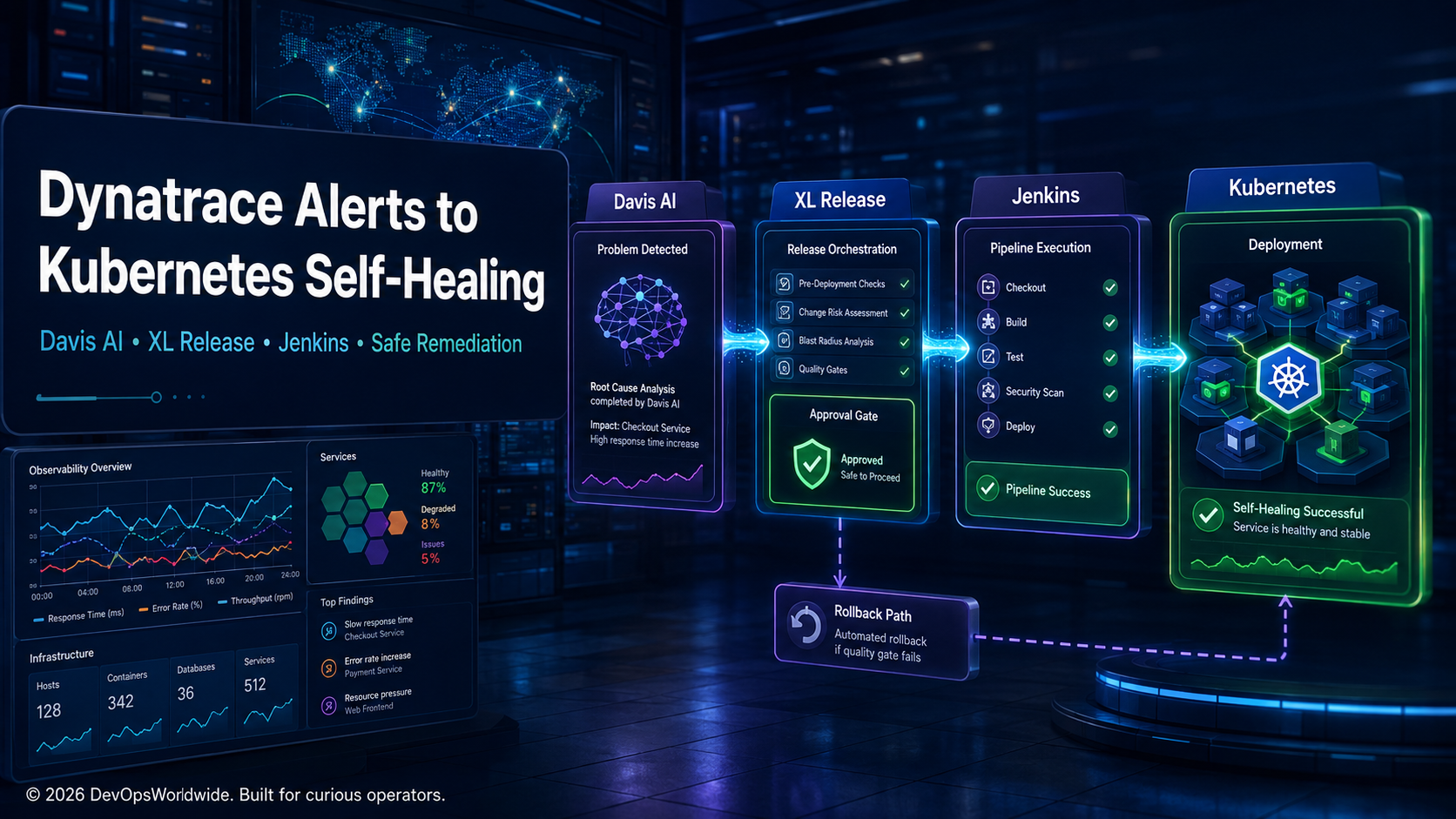
That is where Dynatrace, Digital.ai Release (formerly XL Release), and Jenkins can complement each other:
| System | Job in the operating model |
|---|---|
| Dynatrace Davis AI | Correlate signals, topology, impact, and probable root cause into an actionable problem. |
| Digital.ai Release | Own the remediation workflow, gates, approvals, audit trail, and rollback decision. |
| Jenkins | Execute a versioned, least-privilege remediation job against the correct Kubernetes target. |
| Kubernetes | Provide the deployment primitives: rollout status, restart, scale, rollback, and readiness. |
The result is not an autonomous incident commander. It is a controlled response path that reduces the time spent on repeatable recovery work while keeping engineers in charge of consequential changes.
Automation should execute a proven response, not improvise a diagnosis.
Start with a remediable failure mode
The safest first use cases are narrow and familiar. For example: a deployment is healthy at the Kubernetes control plane, but a known application process becomes stuck after a downstream dependency briefly fails. The service has a clear owner, an existing restart runbook, a good readiness probe, and a verified rollback path.
Do not begin with an alert that could have many causes. “Latency is high” is usually an investigation. “This deployment’s error rate rose after a release, the affected pods are repeatedly failing their readiness probe, and the last known-good revision is available” may be a safe, policy-bound candidate.
Write the remediation contract before building the integration:
remediation: restart-checkout-worker
scope: production / payments / checkout-worker
trigger: Davis problem with approved alerting profile
required_evidence:
  - analysis_ready: true
  - workload: checkout-worker
  - namespace: payments
  - failure_mode: repeated readiness failure
  - customer_impact: below automatic-action threshold
allowed_actions:
  - rollout restart deployment/checkout-worker
  - wait for rollout status
  - validate error-rate and latency recovery
stop_conditions:
  - more than one workload affected
  - no recent known-good runbook match
  - remediation attempted in the last 30 minutes
  - production change window closed
fallback: page service owner and incident commander
This contract is the backbone of the design. It tells every system what it may do, what it must prove, and when it must stop.
Why Davis should trigger the workflow, not blindly trigger the command
Kubernetes emits plenty of useful data: pod restarts, failed probes, node pressure, and warning events. But raw alerts are poor remediation triggers because they do not necessarily express scope, business impact, or causal context.
Dynatrace groups related anomalies into a Davis problem and enriches that problem with affected components, dependencies, impact, and causal analysis. For Kubernetes environments, enabling the appropriate event monitoring lets Davis consider important node, namespace, workload, and pod events during root-cause detection. Dynatrace’s Kubernetes event guidance is a good prerequisite checklist.
The useful trigger is therefore not simply “an alert opened.” It is a problem that has progressed far enough to provide initial analysis. Dynatrace exposes dt.analysis.ready for this purpose: when true, the initial analysis is available and it is a suitable point for notification, integration, or automation—while still allowing the analysis to evolve. See the Davis problem data reference.
An operational sequence might look like this:
Kubernetes workload degrades
        ↓
Dynatrace detects and correlates signals
        ↓
Davis problem is raised and analysis becomes ready
        ↓
Validate scope, alert profile, impact, and cooldown
        ↓
Start governed XL Release remediation
        ↓
Jenkins runs one approved Kubernetes action
        ↓
Dynatrace verifies recovery or routes to humans
Dynatrace Workflows can react to problem events or specific Davis events. The distinction matters: a problem trigger reacts to a grouped problem, while a Davis event trigger reacts to individual anomalies. For remediation, use the unit of work that matches the runbook—usually the problem, not every event. Dynatrace’s workflow trigger reference explains the two models.
Put XL Release in charge of the decision path
Calling Jenkins directly from an alert is quick to demo and hard to govern. It makes the automation path opaque: where did the request come from, what evidence was checked, which approvals applied, and how was the outcome recorded?
Digital.ai Release gives the remediation a first-class workflow. Create a reusable template—not a free-form script—with variables such as:
dynatrace_problem_id
environment
cluster
namespace
workload
remediation_action
expected_revision
cooldown_window
approval_required
Then make each stage explicit:
- Ingest and normalise — record the Dynatrace problem ID, service, environment, and evidence links.
- Validate policy — ensure the workload appears in an allow-list, the environment is correct, and the cooldown is not active.
- Assess blast radius — stop if multiple services, a shared dependency, or an unknown root cause is involved.
- Gate the change — require approval for production actions outside an agreed automatic tier.
- Run Jenkins — pass only the fixed variables required for the remediation.
- Verify recovery — wait for Kubernetes rollout health, then query Dynatrace service indicators.
- Resolve, rollback, or escalate — close with evidence; never quietly retry forever.
Digital.ai Release can invoke Jenkins build or multibranch tasks and track their result as part of the release flow. Configure the Jenkins server connection centrally or at the folder level, use an API token rather than an interactive account, and mark unstable jobs as failures where that is appropriate for the runbook. See Digital.ai’s Jenkins task documentation.
The workflow is also the right place for the human message. An approver should see a small evidence packet, not a vague button:
Problem: P-12345 — checkout-worker readiness failures
Scope: production / payments / checkout-worker
Impact: 2.1% failed checkout requests for 6 minutes
Evidence: rollout 2026.09.05.14, 12 restarting pods, no node pressure
Proposed action: one rollout restart
Rollback: revert to revision 438 if verification fails
Keep Jenkins boring, bounded, and idempotent
Jenkins is the execution engine, not the place to decide what the incident means. The job should accept a small parameter set, validate it again, use narrowly scoped credentials, and emit a machine-readable result back to the release workflow.
A simplified Jenkinsfile pattern:
pipeline {
  agent any
  parameters {
    choice(name: 'ENVIRONMENT', choices: ['production'], description: 'Approved target')
    choice(name: 'NAMESPACE', choices: ['payments'], description: 'Approved namespace')
    choice(name: 'WORKLOAD', choices: ['checkout-worker'], description: 'Approved workload')
    string(name: 'PROBLEM_ID', trim: true)
  }
  stages {
    stage('Validate request') {
      steps {
        sh './scripts/validate-remediation-request.sh'
      }
    }
    stage('Restart one workload') {
      steps {
        sh 'kubectl -n "$NAMESPACE" rollout restart deployment/"$WORKLOAD"'
        sh 'kubectl -n "$NAMESPACE" rollout status deployment/"$WORKLOAD" --timeout=180s'
      }
    }
    stage('Publish evidence') {
      steps {
        sh './scripts/write-remediation-result.sh "$PROBLEM_ID"'
      }
    }
  }
}
The example is intentionally narrow. The Jenkins credential should be bound to a Kubernetes service account that can change only the approved deployment in the approved namespace. It should not have cluster-admin rights, secret read access, or permission to change arbitrary workloads.
The Jenkins Pipeline input step can support an approval point, but prefer the primary approval and audit flow in XL Release so the decision is centralised rather than scattered across tools.
Verification is part of remediation
Restarting a deployment is an action; it is not evidence that the customer experience recovered. Treat remediation as a small experiment with a predeclared success window.
| Check | Example success criterion | Why it matters |
|---|---|---|
| Kubernetes rollout | Desired replicas become ready within three minutes | Confirms the platform-level action completed. |
| Application health | Readiness and liveness remain stable after rollout | Catches restart loops and slow warm-up. |
| Service signal | Error rate falls below the alert threshold | Tests the symptom that caused action. |
| User impact | Checkout success rate returns to baseline | Avoids declaring success from infrastructure data alone. |
| Change record | Problem, release, Jenkins build, and deployment revision are linked | Makes review and learning possible. |
Give Dynatrace enough time to evaluate the changed service, but do not encode a fixed sleep and declare victory. Query the service-level metric or SLO that justified the response. If the expected recovery does not occur, mark the release as failed, attach the evidence, and page the assigned owner. A second automatic restart often increases uncertainty without increasing reliability.
The guardrails that prevent helpful automation becoming risky automation
Self-healing is safest when its boundaries are visible and testable.
Use an allow-list, never free-form resource input
The alert payload may suggest a service; it should not supply an arbitrary kubectl command. Resolve it through a maintained mapping:
checkout-worker:
  environment: production
  namespace: payments
  deployment: checkout-worker
  allowed_actions: [rollout-restart, rollback]
  automatic_action: rollout-restart
  cooldown_minutes: 30
  owner: payments-sre
Limit frequency and concurrent scope
Use a lock per workload, a short cooldown after any attempt, and an organisation-level ceiling for active remediations. If five services degrade together, the platform should assume a broader condition and call humans—not restart five workloads in parallel.
Preserve a human-controlled exit
Every automated job needs a stop switch. It can be a Release variable, a feature flag, a change-window control, or a policy check—but it must be simple enough to use during an incident. Also make rollback executable by a human with the same evidence context.
Keep secrets out of alert payloads and logs
Dynatrace links, problem identifiers, and workload names are useful. Tokens, kubeconfigs, customer data, and raw request bodies are not. Use the credential stores of Digital.ai Release and Jenkins; pass references or scoped variables, not secrets, through the workflow.
A production readiness checklist
Before enabling a remediation automatically, run it through this checklist:
- The failure mode has a written runbook and a known safe action.
- The Dynatrace problem is scoped to one understood workload.
- The trigger waits for analysis-ready context and validates an allow-list.
- The Release template records evidence, gates, and ownership.
- Jenkins uses least-privilege, short-lived or tightly scoped credentials.
- The Kubernetes action is idempotent or protected against duplicate execution.
- Success is measured with application and user-impact signals, not only pod status.
- There is a cooldown, concurrency limit, rollback path, and human escalation route.
- Game days have tested both the successful remediation and the failed-remediation path.
Build confidence gradually
The maturity path should move from visibility to recommendation to bounded execution:
1. Dynatrace opens a problem and enriches the incident
2. XL Release creates a proposed remediation with evidence
3. An engineer approves Jenkins execution
4. The workflow verifies recovery and records learning
5. A narrow, repeatable case becomes pre-approved automation
Start with a non-production namespace or a low-risk worker service. Run intentional failure drills. Compare the automated result with what the on-call engineer would have done. When the workflow is wrong, improve the trigger or the runbook; do not add more retries.
Clear takeaways
- Davis AI provides valuable causal context, but problem detection is not permission to change production.
- XL Release makes remediation a governed workflow with evidence, approvals, and an audit trail.
- Jenkins should perform one constrained, validated Kubernetes action—not accept arbitrary commands from an alert.
- Recovery must be measured against the customer-facing signal that motivated remediation.
- The best self-healing capability is narrow, reversible, observable, and easy to disable.
The ambition is not a platform that acts without engineers. It is a platform that handles the known, safe response quickly and presents the unknown, high-impact response with the context an engineer needs to decide well.