A deployment finishes successfully on Friday. On Monday, an administrator makes an urgent change directly in the sandbox. By the next release, Git and the org describe different versions of the application.
The next pipeline run might overwrite a useful fix. It might also preserve an unwanted change because that component is outside the deployment manifest. A green build alone cannot tell the team which situation it is facing.
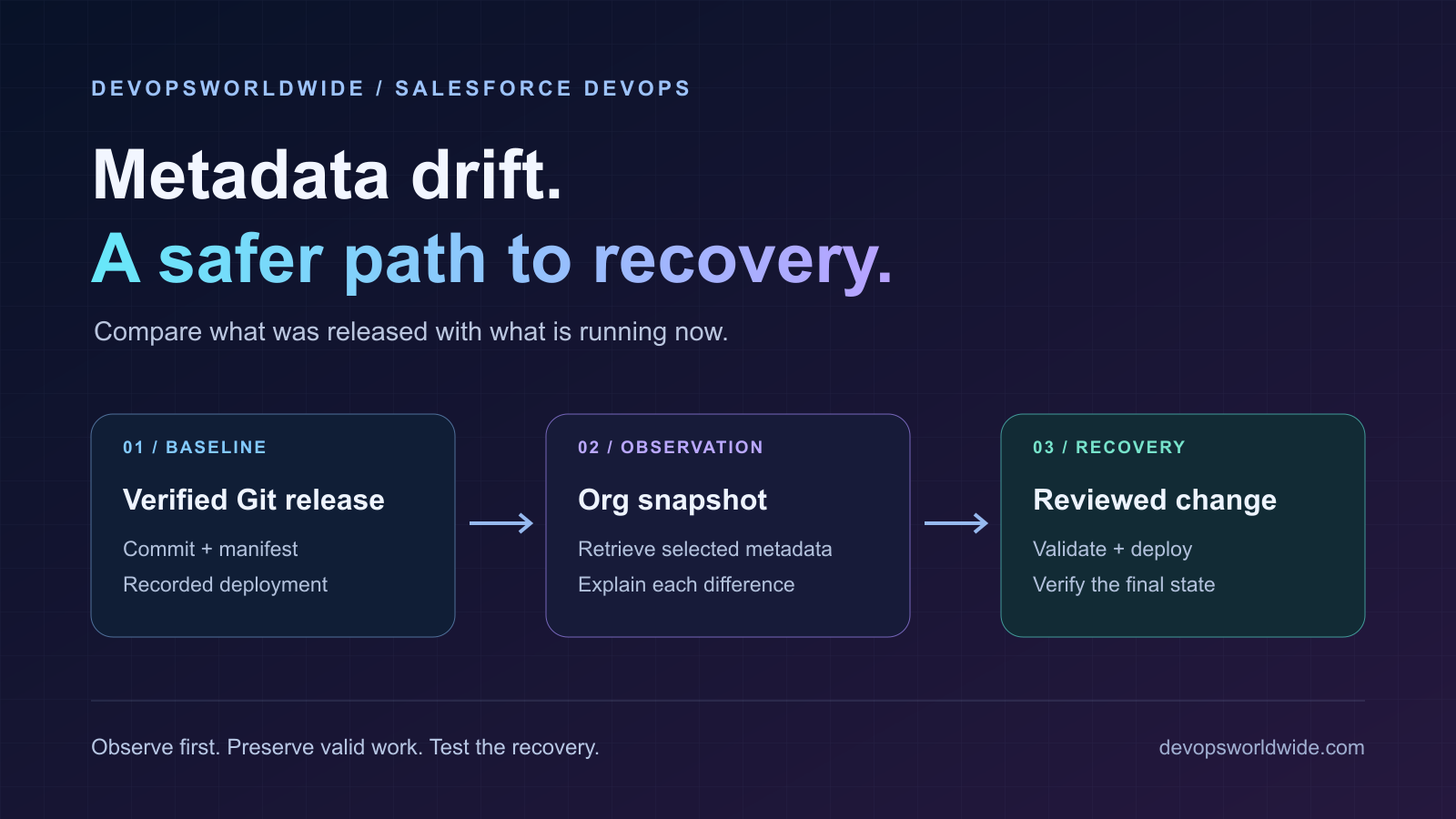
Our previous guide covered Salesforce CI/CD with GitHub Actions. This article looks at the work between releases: detecting unexpected metadata changes, deciding which version should be retained, and recovering through a controlled deployment.
The examples are a sandbox exercise, not a production recovery runbook. They use the two Apex classes from the CI/CD guide. A verified initial sandbox deployment is a prerequisite; if you have not completed it, establish that baseline first. No successful sandbox recovery is claimed here.
Drift is a difference that needs an explanation
For this exercise, metadata drift means a difference between the metadata observed in the org and the metadata expected from a verified release, within a defined comparison scope.
That definition matters. The latest commit on main may not be the commit deployed to the sandbox. Some differences are deliberate: environment-specific endpoints, a reviewed emergency fix, or a feature installed through a separate release process.
Do not automatically label every difference a defect. Record it, identify its owner, and decide whether to adopt it, correct it, or document it as an intentional exception.
| What you observe | What to investigate |
|---|---|
| An Apex class differs | Was it changed in the org, deployed by another pipeline, or compared against the wrong release? |
| A component is absent from the retrieval | Was it deleted, omitted from the manifest, inaccessible to the user, or unsupported by the retrieval? |
| Only ordering or formatting differs | Is the difference caused by serialization or a tooling/API version change? |
| Files match but behavior differs | Check permissions, data, activation state, integrations, and configuration outside the selected scope. |
The outcome of a good drift check is an explainable report, not an automatic overwrite.
1. Establish what was actually released
Use the commit SHA recorded by the successful deployment, together with the target org ID, manifest, test outcome, and deployment job ID. A branch name is a moving reference; a recorded release commit is a better comparison baseline.
For the small practice project, the initial scope is:
DeploymentGreetingDeploymentGreetingTest- Their metadata companion files and the release manifest
Run the following examples in Bash from the Salesforce project, with Git, Salesforce CLI, and jq installed. Use the same reviewed CLI version as the release where possible. The sample project uses API 65.0; confirm that your sandbox supports it and that it matches your release records.
Set RELEASE_SHA to the full commit SHA of a confirmed successful sandbox deployment, SF_TARGET_ORG to an already authenticated sandbox alias, and SF_EXPECTED_ORG_ID to its expected org ID. Authentication belongs in your established secure setup, not in the article’s commands.
set -euo pipefail
: "${RELEASE_SHA:?Set the verified release commit SHA}"
: "${SF_TARGET_ORG:?Set the authenticated sandbox alias}"
: "${SF_EXPECTED_ORG_ID:?Set the expected sandbox org ID}"

git cat-file -e "${RELEASE_SHA}^{commit}"
sf --version
git rev-parse "${RELEASE_SHA}^{commit}"
If the release evidence is missing, stop calling the comparison a release drift check. You can still inventory the org, but first reconcile which version the team considers its baseline.
2. Confirm the destination and isolate the snapshot
Create a private temporary workspace. Extract the baseline from Git into one directory and retrieve the org into another. This keeps retrieval away from the files you are actively editing.
umask 077
snapshot_root=$(mktemp -d)
mkdir -p "$snapshot_root/baseline"
git archive "$RELEASE_SHA" | tar -x -C "$snapshot_root/baseline"

[[ "$SF_EXPECTED_ORG_ID" =~ ^00D[a-zA-Z0-9]{12}([a-zA-Z0-9]{3})?$ ]] \
  || { echo 'Invalid expected org ID.' >&2; exit 1; }

sf data query --target-org "$SF_TARGET_ORG" \
  --query 'SELECT Id, IsSandbox FROM Organization' --json \
  > "$snapshot_root/org.json"

jq -e --arg expected "$SF_EXPECTED_ORG_ID" '
  .status == 0 and (.result.records | length) == 1 and
  .result.records[0].IsSandbox == true and
  (.result.records[0].Id[0:15] == $expected[0:15])
' "$snapshot_root/org.json" > /dev/null
Run these steps in order and stop if any command fails. The guard checks both org identity and sandbox status; an alias by itself establishes neither. This exercise intentionally excludes production and Developer Edition orgs.
Treat retrieved configuration and diagnostic output as private project material. Inspect it before attaching it to a ticket or committing it. Keep snapshots out of public CI artifacts, apply your team’s retention policy, and remove the temporary workspace after the evidence you need is secured.
3. Retrieve a bounded set of metadata
Retrieve the manifest from the release baseline into a fresh output directory:
sf project retrieve start \
  --target-org "$SF_TARGET_ORG" \
  --manifest "$snapshot_root/baseline/manifest/package.xml" \
  --api-version 65.0 \
  --output-dir "$snapshot_root/observed" \
  --wait 30 --json > "$snapshot_root/retrieve.json"
Require successful completion and inspect warnings before comparing anything. A timeout, partial result, or missing expected component is an inconclusive check, not evidence that the org is clean. Continue inspecting the same retrieval rather than blindly starting another operation.
The CLI’s retrieve command reference documents the separate output directory and its overwrite behavior. Use a new directory for each observation so old files cannot make an incomplete retrieval look complete.
This manifest deliberately limits the exercise to two classes. It will not discover an unrelated new Flow, permission set, or field. Broader drift detection needs an agreed metadata inventory and coverage review; do not describe a small manifest as a backup of the whole org.
4. Compare without changing the source of truth
Inspect the retrieved paths instead of assuming they have the same directory prefix as the Git project:
find "$snapshot_root/observed" -type f \
  \( -name '*.cls' -o -name '*.cls-meta.xml' \) -print
Locate DeploymentGreeting.cls in that output and set RETRIEVED_CLASS to its exact path. Then compare it with the released source:
: "${RETRIEVED_CLASS:?Set the exact retrieved class path}"
if git diff --no-index -- \
  "$snapshot_root/baseline/force-app/main/default/classes/DeploymentGreeting.cls" \
  "$RETRIEVED_CLASS"; then
  echo 'No differences in this file.'
else
  diff_status=$?
  [[ "$diff_status" == 1 ]] \
    || { echo 'Comparison failed.' >&2; exit "$diff_status"; }
  echo 'Differences found: review before proceeding.'
fi
For git diff --no-index, exit code 0 means no differences, 1 means differences were found, and a higher value indicates an error. A drift job should distinguish these outcomes rather than treating every nonzero result as the same failure.
Repeat the comparison for the test class and both companion files. Account for every expected member before recording a clean result. Save the baseline SHA, observation time, component names, and a reviewed diff in the release record.
Raw differences are evidence to review. If tooling introduces noise, normalize only the known presentation difference and retain the original files. Reordering arbitrary XML or dropping unfamiliar elements can hide a real change.
5. Use source tracking where it is available
In a project and org configured for source tracking, preview can help identify changes before retrieving:
sf project retrieve preview --target-org "$SF_TARGET_ORG"Source tracking is useful context, but it is not a universal history of everything in the org. Its behavior depends on the org, local tracking state, and supported metadata types. Salesforce documents these boundaries in its source tracking guide.
Do not infer that an org matches a release solely because preview reports no tracked changes. The manifest snapshot answers a different question: what do the selected components look like now compared with the recorded release?
Avoid making --ignore-conflicts a default troubleshooting step. First identify whose work would be overwritten and which version has been reviewed.
6. Decide whether to adopt or correct the change
Suppose the snapshot shows that an administrator improved the greeting’s handling of blank input. If that change is valid, bring the reviewed source into a feature branch, update the tests, and take it through the normal pull-request workflow. Preserve the reason for the emergency change in the release record.
If the org change is unwanted, prepare a recovery branch from the current reviewed source. Restore only the affected component from the last known-good release, or write a forward fix that preserves later valid work.
There are two different recovery decisions:
| Approach | Suitable situation | Main review question |
|---|---|---|
| Restore selected metadata | A bounded component change should be undone | Will the previous version still work with current dependencies and data? |
| Deploy a forward fix | Valid changes have accumulated since the earlier release | Does the correction preserve those changes while fixing the behavior? |
Reverting Git changes the repository. Salesforce changes only after an appropriate deployment succeeds. Re-deploying an older manifest also does not automatically remove components that were introduced later.
Component deletion needs a separately reviewed destructive-change plan. Salesforce provides explicit destructive deployment flags; they are intentionally outside this introductory exercise. Restoring metadata does not restore records lost through an earlier data operation.
7. Validate recovery against the current org
Prepare manifest/recovery.xml in the recovery branch with the specific reviewed components. Include dependencies when the change requires them. For the two-class lab, run a dry run with the named test class:
sf project deploy start \
  --target-org "$SF_TARGET_ORG" \
  --manifest manifest/recovery.xml \
  --api-version 65.0 \
  --test-level RunSpecifiedTests \
  --tests DeploymentGreetingTest \
  --dry-run --wait 30
The previous lab workflow uses manifest/package.xml. Before executing recovery through that workflow, either review a change to use manifest/recovery.xml for both validation and deployment, or put the reviewed recovery scope at its existing manifest path. Do not validate one manifest and deploy another.
A dry run validates without saving the metadata. A larger application needs a test scope appropriate to its dependencies; this named test is specific to the practice example. Review the deployment command reference when adapting the flags.
Check the final server-side result. If the CLI stops waiting, inspect the returned deployment job ID with sf project deploy report; do not treat elapsed time as either success or cancellation.
Coordinate a change window so the org does not change underneath the recovery. If another release or administrator edit occurs after the comparison, refresh the evidence and reassess the plan. Deploy the exact reviewed commit through the existing gated pipeline, then verify its final status, run the smoke check, and take another scoped snapshot.
A drift report that helps BAU work
Keep the operational report short enough to act on:
| Field | Example of what to record |
|---|---|
| Baseline | Successful release commit and deployment job ID |
| Observation | Sandbox identity, UTC timestamp, manifest, CLI/API versions |
| Coverage | Expected components, retrieved components, warnings or omissions |
| Difference | Changed component and a private reviewed diff |
| Decision | Adopt, correct, accept temporarily, or investigate |
| Ownership | Reviewer, change reference, and next action |
| Verification | Recovery commit, final deployment result, test and smoke outcomes |
A scheduled drift job should produce no differences, differences found, or inconclusive, rather than collapsing all results into a green or red icon. It should report unexpected changes for review; automatically pushing org snapshots into main would turn observation into an unreviewed release decision.
For the practice exercise, completion means demonstrating a deliberate sandbox change, detecting it against a verified baseline, reviewing the correction, and confirming the final org state after recovery. Until those observations exist, the procedure remains a plan to execute rather than a completed recovery test.
Thank you
Thank you to Nikita Raut, Salesforce Developer, for her contribution to this article and for sharing her Salesforce expertise with the DevOpsWorldwide community.